La phase d'introduction de tous mes projets au sein du jeu Minecraft ce fait d'une seule et même manière. Une petite animation faisant apparaitre, sous un glissement de couleur, le visage de mon skin.
Voici un exemple :
Cette animation est réalisée en remplaçant ce que le joueur voit de manière successive.
A chaque remplacement la structure est remplacée par la suivante, stockée dans un endroit non visible.
# passe le joueur en mode spectateur gamemode spectator @a[tag=spawn_6] # pose les condition initiale pour l'animation fill -161 93 -68 -144 93 -51 Minecraft:gray_concrete fill -161 94 -68 -144 94 -51 Minecraft:air tp @a[tag=spawn_6] -153.0 103 -59.0 -90 90 tag @a[tag=spawn_6] add opening.current tag @a remove spawn_6 scoreboard objectives add bleyzer_creation dummy # valide la condition pour la boucle scoreboard players set timer bleyzer_creation 1
#boucle execute if score timer bleyzer_creation matches 1.. run scoreboard players add timer bleyzer_creation 1 execute if score timer bleyzer_creation matches 1.. run tp @a[tag=opening.current] -154.0 104 -59.0 -90 90 execute if score timer bleyzer_creation matches 4 run clone -144 77 -68 -161 77 -51 -161 93 -68 execute if score timer bleyzer_creation matches 8 run clone -144 78 -68 -161 78 -51 -161 93 -68 execute if score timer bleyzer_creation matches 12 run clone -144 79 -68 -161 79 -51 -161 93 -68 execute if score timer bleyzer_creation matches 16 run clone -144 80 -68 -161 80 -51 -161 93 -68 execute if score timer bleyzer_creation matches 20 run clone -144 81 -68 -161 81 -51 -161 93 -68 execute if score timer bleyzer_creation matches 24 run clone -144 82 -68 -161 82 -51 -161 93 -68 execute if score timer bleyzer_creation matches 28 run clone -144 83 -68 -161 83 -51 -161 93 -68 execute if score timer bleyzer_creation matches 32 run clone -144 84 -68 -161 84 -51 -161 93 -68 execute if score timer bleyzer_creation matches 36 run clone -144 85 -68 -161 85 -51 -161 93 -68 execute if score timer bleyzer_creation matches 40 run clone -144 86 -68 -161 86 -51 -161 93 -68 execute if score timer bleyzer_creation matches 44 run clone -144 87 -68 -161 87 -51 -161 93 -68 execute if score timer bleyzer_creation matches 48 run clone -144 88 -68 -161 88 -51 -161 93 -68 execute if score timer bleyzer_creation matches 52 run clone -144 89 -68 -161 89 -51 -161 93 -68 execute if score timer bleyzer_creation matches 56 run clone -144 90 -68 -161 91 -51 -161 93 -68 execute if score timer bleyzer_creation matches 56 run title @a subtitle {"text","bleyzer's creations","bold":true,"color":"#FFB219"} execute if score timer bleyzer_creation matches 56 run title @a title "" execute if score timer bleyzer_creation matches 56 run schedule function bleyzer_creation:end 5s
gamemode adventure @a[tag=opening.current] tag @a[tag=opening.current] add intro.tures.0 tag @a remove opening_current scoreboard objectives remove bleyzer_creation tp @a[tag=intro.tures.0] 475 101.50 -96 90 0
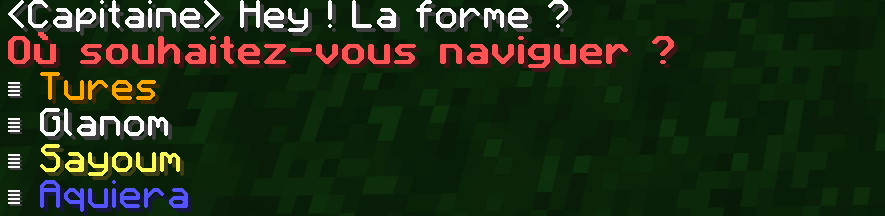
J'ai fait le choix de rendre le projet Wyrd's Tales jouable pour les francophones et anglophones. Je souhaite également faire le doublage de tous les dialogues en français et en anglais.
Avant de commencer à jouer, dans la salle de paramètrage, le joueur à accès à différents paramètres dont le choix de la langue écrite et parlé. Il pourra aussi choisir s'il souhaite avoir le sous-titrage ou non.
Ces options peuvent être modifiée à tout instant par le joueur, mais nécessite pour certaines de relancer la sauvegarde pour être mis à jour du aux quelques limitations de Minecraft.
J'ai la volonté que mon projet, Wyrd's Tales, puisse être joué par le plus grand nombre en abaissant le maximum de barrières possibles.
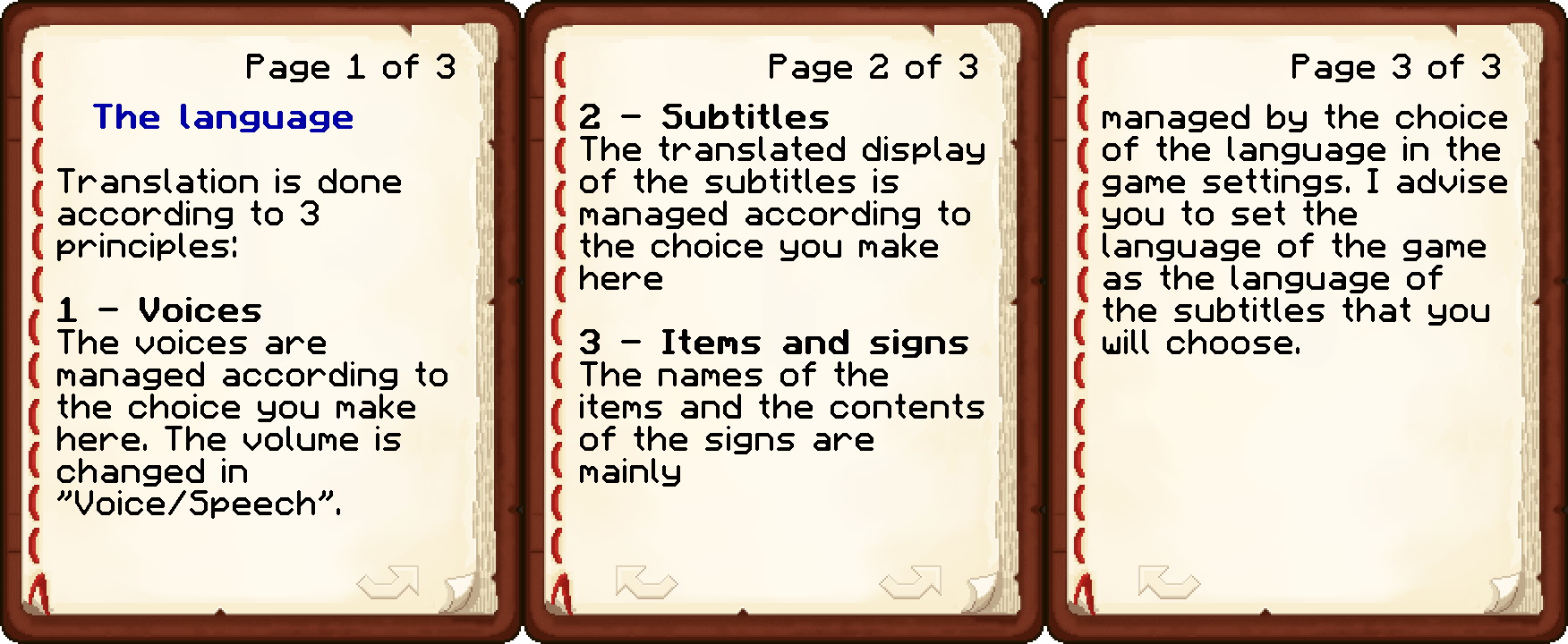
Le niveau de difficulté en est une. En laissant le choix aux joueurs de choisir la difficulté avec laquelle ils souhaitent jouer et en leur laissant la possibilité de la changer à tout moment, je permet à chacun de vivre l'expérience qu'il recherche à travers mon univers.
Pour cela, à l'instar du langage, un tag est donné au joueur. Celui-ci sera vérifié avant chaque apparition d'entités hostiles pour ajuster leur force, point de vie, vitesse, sortilèges, etc... Il n'est donc pas nécessaire de relancer la sauvegarde pour prendre effet.
Toujours dans la veine de l'accessibilité, l'aide à la visée permet aux joueurs ne souhaitant pas avoir à viser parfaitement en permanence, de profiter de toutes les facettes du jeu.
Cette fonctionnalité est encore en prototypage car assez complexe à mettre en place. Il faut faire des choix quant à l'entité viser. Faut-il viser la plus proche ? Celle la plus en face du joueur ? Celle la plus faible ou plus forte ? Celle possedant le moins de point de vie ?
La force de l'aide peut être ajustée entre light, medium et hard.
En voilà une preview de l'assistance medium puis hard :
execute as @p[tag=aim.assist.light] run function general:aim/assist_light execute as @p[tag=aim.assist.medium] run function general:aim/assist_medium execute as @p[tag=aim.assist.hard] run function general:aim/assist_hard
advancement revoke @s only general:aiming execute anchored eyes facing entity @e[type=!#general:ignore,sort=nearest,limit=1,distance=0.1..50] eyes positioned ^ ^ ^0.5 rotated as @s positioned ^ ^-0.03 ^1 facing entity @s eyes facing ^ ^ ^-1 positioned as @s run tp @s ~ ~ ~ ~ ~
advancement revoke @s only general:aiming execute anchored eyes facing entity @e[type=!#general:ignore,sort=nearest,limit=1,distance=0.1..50] eyes positioned ^ ^ ^0.5 rotated as @s positioned ^ ^-0.03 ^6 facing entity @s eyes facing ^ ^ ^-1 positioned as @s run tp @s ~ ~ ~ ~ ~
advancement revoke @s only general:aiming execute anchored eyes facing entity @e[type=!#general:ignore,sort=nearest,limit=1,distance=0.1..50] eyes positioned ^ ^ ^0.5 rotated as @s positioned ^ ^-0.03 ^8 facing entity @s eyes facing ^ ^ ^-1 positioned as @s run tp @s ~ ~ ~ ~ ~
Ce que nous appelons cinématiques, sont tous les déplacements automatiques mis en scène durant l'aventure, laissant le joueur spectateur de l'action.
Ici nous nous intéressons principalement aux déplacements. Ils sont mis en marche par de nombreuses petites téléportations du joueurs vers sa destination. Dans Minecraft le temps est découpé en ticks. 1 tick vaut 1/20 seconde. Si nous voulons qu'un joueur aille du point a au point B en 8 secondes il faudra découper son déplacement en 160 fractions de déplacement (1 par tick).
Cela donne en pratique de jolis rendus pour mettre en scène les personnages non joueurs, montrer des évènements (porte qui s'ouvre) et pour présenter des lieux.
En voilà deux exemples :
execute as @a[tag=cinematic.sayoum.add] run function cinematiques:sayoum/main execute as @a[tag=current.cinematic.sayoum] run function cinematiques:sayoum/main
tag @s[tag=cinematic.sayoum.add] add current.cinematic.sayoum tag @s[tag=cinematic.sayoum.add] remove cinematic.sayoum.add scoreboard players add @a[tag=current.cinematic.sayoum] cinematic.delay 1 execute as @s[scores={cinematic.delay=0..160}] run function cinematiques:sayoum/1 execute as @s[scores={cinematic.delay=161..300}] run function cinematiques:sayoum/2 execute as @s[scores={cinematic.delay=301..}] run function cinematiques:sayoum/end tp @s[scores={cinematic.delay=1}] 1550.5 75 -187 -180 2 tp @s[scores={cinematic.delay=161}] 1538.074 120.266 -298.008 -9.5 36.2
execute as @s at @s run tp @s ~ ~ ~-0.5037 ~ ~0.0225 #1550.5 75 -287.732 -180 6.5
execute as @s at @s run tp @s ~-0.1819 ~-0.1537 ~0.2317 ~-0.17 ~-0.0025 #1501.691 89.527 -251.669 -58.1 22.8
tag @s remove current.cinematic.sayoum scoreboard players reset @s cinematic.delay
Permettre au joueur de discuter avec les personnages non joueur du jeu est essentiel pour l'interraction et l'immersion.
Pour cela, le jeu vérifie très régulièrement si le joueur a intéragi avec un NPC. Si c'est le cas, le NPC visé déclenche alors son interraction. Ca peut n'être qu'une phrase, mais ça peut aussi ouvrir une boutique ou lancer une cinématique.
Exemple d'un dialogue basique dans les rues de Glanom :
execute as @a[scores={smalltalk1=1..}] at @s if entity @e[tag=smalltalk1,distance=..3.3] run function smalltalks:glanom/smalltalk1 scoreboard players reset @a[scores={smalltalk1=1..}] smalltalk1 execute as @a[scores={smalltalk2=1..}] at @s if entity @e[tag=smalltalk2,distance=..3.3] run function smalltalks:glanom/smalltalk2 scoreboard players reset @a[scores={smalltalk2=1..}] smalltalk2 execute as @a[scores={smalltalk3=1..}] at @s if entity @e[tag=smalltalk3,distance=..3.3] run function smalltalks:glanom/smalltalk3 scoreboard players reset @a[scores={smalltalk3=1..}] smalltalk3
tellraw @s [{"text":"Ahh\n","color":"light_purple","bold":"false"},{"text":"I love this city, don't you?","color":"light_purple"}]
tellraw @s [{"text":"Am i the only one seeing the flying smoke in the sky\n","color":"light_purple","bold":"false"},{"text":"I mean come on man smoke not usually acts this way!","color":"light_purple"}]
tellraw @s [{"text":"Such a great day for farming!\n","color":"light_purple","bold":"false"},{"text":"am i right or am i right?","color":"light_purple"}]
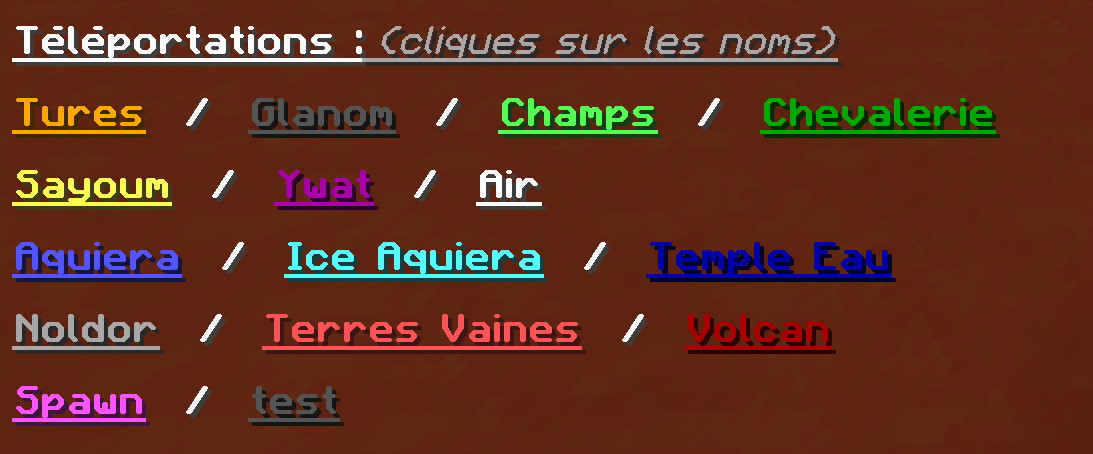
Les téléportations ne sont accessibles aux joueurs que via certains points précis dans la zone de magie et le capitaine Cord. Ce dernier propose de naviguer vers une des destinations qu'il connait. Bien que pour le joueur la téléportation est camouflée derrière une traversée en bateau elle a bien lieu.
Cependant les téléportations ont une autre utilitée, pour les concepteurs cette fois. Des lieux ont été enregistrés, et nous (les personnes ayant travaillé sur le projet) pouvons nous y téléporter à notre guise.
Exemple pour la téléportation vers la zone Air :

tellraw @a ["",{"text":"\n","bold":true,"underlined":true},{"text":"Téléportations :","bold":true,"underlined":true},{"text":" (cliques sur les noms)","bold":false,"italic":true,"underlined":true,"color":"gray"},{"text":"\n\n","bold":true,"underlined":true}, {"text":"Tures","bold":true,"underlined":true,"color":"gold","clickEvent":{"action":"run_command","value":"/tp @s 484 125 -119 52 19"}},{"text":" \u0020/ \u0020","bold":true}, {"text":"Glanom","bold":true,"underlined":true,"color":"dark_gray","clickEvent":{"action":"run_command","value":"/tp @s -41 88 -1060 -323 10"}},{"text":" \u0020/ \u0020","bold":true}, {"text":"Champs","bold":true,"underlined":true,"color":"green","clickEvent":{"action":"run_command","value":"/tp @s -60 91 -976 -330 31"}},{"text":" \u0020/ \u0020","bold":true}, {"text":"Chevalerie","bold":true,"underlined":true,"color":"dark_green","clickEvent":{"action":"run_command","value":"/tp @s -92 104 -1257 -153 21"}},{"text":"\n\n","bold":true}, {"text":"Sayoum","bold":true,"underlined":true,"color":"yellow","clickEvent":{"action":"run_command","value":"/tp @s 1534 86 -219 219 16"}},{"text":" \u0020/ \u0020","bold":true}, {"text":"Ywat","bold":true,"underlined":true,"color":"dark_purple","clickEvent":{"action":"run_command","value":"/tp @s 2627 75 -569 139 -6"}},{"text":" \u0020/ \u0020","bold":true}, {"text":"Air","bold":true,"underlined":true,"clickEvent":{"action":"run_command","value":"/tp @s 3883 103 779 110 10"}},{"text":"\n\n","bold":true}, {"text":"Aquiera","bold":true,"underlined":true,"color":"blue","clickEvent":{"action":"run_command","value":"/tp @s 1073 86 427 -73 20"}},{"text":" \u0020/ \u0020","bold":true}, {"text":"Ice Aquiera","bold":true,"underlined":true,"color":"aqua","clickEvent":{"action":"run_command","value":"/tp @s 1900 35.2 434.2 153.5 0"}},{"text":" \u0020/ \u0020","bold":true}, {"text":"Temple Eau","bold":true,"underlined":true,"color":"dark_blue","clickEvent":{"action":"run_command","value":"/tp @s 1884.0 21.5 403.8 0 8"}},{"text":"\n\n","bold":true}, {"text":"Noldor","bold":true,"underlined":true,"color":"gray","clickEvent":{"action":"run_command","value":"/tp @s 2535 113 472 135 22"}},{"text":" \u0020/ \u0020","bold":true}, {"text":"Terres Vaines","bold":true,"underlined":true,"color":"red","clickEvent":{"action":"run_command","value":"/tp @s -212 98 -1055 -304 37"}},{"text":" \u0020/ \u0020","bold":true}, {"text":"Volcan","bold":true,"underlined":true,"color":"dark_red","clickEvent":{"action":"run_command","value":"/tp @s -670.5 98 -1071.7 80 17"}},{"text":"\n\n","bold":true}, {"text":"Spawn","bold":true,"underlined":true,"color":"light_purple","clickEvent":{"action":"run_command","value":"/tp @s -452 128 -70 90 0"}},{"text":" \u0020/ \u0020","bold":true}, {"text":"test","bold":true,"underlined":true,"color":"dark_gray","clickEvent":{"action":"run_command","value":"/tp @s 299948 94 300031 -143 23"}},{"text":"\n","bold":true}]

tellraw @s ["",{"text":"<Capitaine> Hey ! La forme ?\n"},{"text":"Où souhaitez-vous naviguer ?","bold":true,"color":"red","hoverEvent":{"action":"show_text","value":{"text":"Cliquez sur la destination de votre choix","color":"white"}}}] execute as @s at @s if entity @e[limit=1,sort=nearest,tag=Captain,tag=!Tures] run tellraw @s ["",{"text":"\u2263 "},{"text":"Tures","color":"gold","clickEvent":{"action":"run_command","value":"/function voyage_bateau:select/tures"},"hoverEvent":{"action":"show_text","value":{"text":"Voyage vers Tures"}}}] execute as @s at @s if entity @e[limit=1,sort=nearest,tag=Captain,tag=!Glanom] run tellraw @s ["",{"text":"\u2263 "},{"text":"Glanom","color":"purple","clickEvent":{"action":"run_command","value":"/function voyage_bateau:select/glanom"},"hoverEvent":{"action":"show_text","value":{"text":"Voyage vers Glanom"}}}] execute as @s at @s if entity @e[limit=1,sort=nearest,tag=Captain,tag=!Sayoum] run tellraw @s ["",{"text":"\u2263 "},{"text":"Sayoum","color":"yellow","clickEvent":{"action":"run_command","value":"/function voyage_bateau:select/sayoum"},"hoverEvent":{"action":"show_text","value":{"text":"Voyage vers Sayoum"}}}] execute as @s at @s if entity @e[limit=1,sort=nearest,tag=Captain,tag=!Aquiera] run tellraw @s ["",{"text":"\u2263 "},{"text":"Aquiera","color":"blue","clickEvent":{"action":"run_command","value":"/function voyage_bateau:select/aquiera"},"hoverEvent":{"action":"show_text","value":{"text":"Voyage vers Aquiera"}}}]
# fire spell function spells:fire_spell/fire_spell_lock # earth spell function spells:earth_spell/earth_spell_lock function spells:earth_spell/timer
Ce sort permet au joueur de déployer une griffe acérée enflammée devant lui qui endommage les ennemis et les brûle.
execute as @a[nbt={SelectedItem:{id:"Minecraft:carrot_on_a_stick",Count:1b,tag:{display:{Name:'[{"text":"Fire ","color":"gold","bold":true},{"text":"Staff","color":"gray","bold":false}]'},HideFlags:4,Unbreakable:1b,CustomModelData:5}}},scores={mana=2..}] if entity @s[scores={firespell=1..}] run function spells:fire_spell/fire_spell execute as @e[type=armor_stand,tag=scratch] run function spells:fire_spell/animation scoreboard players reset @a firespell
# donne un tag au joueur pour ne pas que le sort l'affecte tag @s add fire_bender # fait apparaitre l'armor_stand et le place correctement execute at @s positioned ^ ^ ^1.5 run summon Minecraft:armor_stand ^ ^ ^ {NoGravity:1b,Tags:["scratch"],Invisible:1b,Marker:1b} execute at @e[type=armor_stand,tag=scratch] run execute as @e[distance=..2,type=!item_frame,type=!item,tag=!fire_bender] run function spells:fire_spell/burn execute as @s at @s run tp @e[type=Minecraft:armor_stand,tag=scratch] ^0.75 ^ ^0.25 ~ ~ # retire 2 mana et reset le score du joueur dans firespell scoreboard players remove @s mana 40 # programme la suppression de l'armor_stand et retire le tag au joueur schedule function spells:fire_spell/kill 8t tag @s remove fire_bender
# fait subir les effets du sort aux entites ciblees effect give @s Minecraft:resistance 1 2 true effect give @s Minecraft:instant_damage 1 1 true
# supprime l'armor_stand responsable de l'animation kill @e[type=armor_stand,tag=scratch]
# affiche les particule de feu execute as @s at @s run particle Minecraft:flame ^ ^2 ^ 0 0 0 0.001 1 normal execute as @s at @s run particle Minecraft:flame ^1 ^2 ^ 0 0 0 0.005 2 normal execute as @s at @s run particle Minecraft:flame ^-1 ^2 ^ 0 0 0 0.005 2 normal execute as @s at @s run particle Minecraft:flame ^0.5 ^2 ^ 0 0 0 0.005 2 normal execute as @s at @s run particle Minecraft:flame ^-0.5 ^2 ^ 0 0 0 0.005 2 normal # deplace l'armor_stand pour la prochaine occurence de l'animation execute as @s at @s run tp @s ^ ^ ^ ~4 ~8
Ce sort permet au joueur de faire un saut qui produit un tremblement de terre une fois qu'il atterrit. Cela a pour effet d'assommer les ennemis faibles et de ralentir les ennemis plus puissants.
execute as @a[nbt={SelectedItem:{id:"Minecraft:carrot_on_a_stick",Count:1b,tag:{display:{Name:'[{"text":"Earth ","color":"dark_green","bold":true},{"text":"Staff","color":"gray","bold":false}]'},HideFlags:4,Unbreakable:1b,CustomModelData:4}}},scores={mana=3..}] run function spells:earth_spell/earth_spell
execute as @s run effect give @s Minecraft:jump_boost 1 3 true execute as @s[nbt={OnGround:0b}] run tag @s add inair execute as @s[tag=inair] if entity @s[nbt={OnGround:1b}] run function spells:earth_spell/landed tag @a remove earth_bender
# tag pour separer le joueur des autres entites tag @s add earth_bender # particules execute as @s at @s run particle Minecraft:block dirt ~ ~ ~ 3 0 3 0.01 200 normal execute as @s at @s run particle Minecraft:block grass ~ ~1 ~ 1 0.7 1 0.001 40 normal # effet du sort execute at @s as @e[distance=..5,type=!Minecraft:player,type=!item_frame,tag=!boss] run data merge entity @s {Motion:[0d,1d,0d]} execute at @s as @e[distance=..5,type=!Minecraft:player,type=!item_frame,tag=!boss] run effect give @s instant_damage 1 1 true execute at @s as @a[distance=..5] run effect give @s Minecraft:slowness 1 255 true execute at @s as @a[distance=..5] run effect give @s Minecraft:jump_boost 1 150 true execute at @s as @a[distance=..5,tag=!earth_bender] at @s if block ~ ~ ~ air run particle Minecraft:block sand ~ ~ ~ 0.5 -0.5 0.5 0.01 40 normal execute at @s as @a[distance=..5] run tag @s add inGround execute at @s as @a[distance=..5,tag=inGround] at @s if block ~ ~ ~ air run tp @s ~ ~-1 ~ # reset tag @s remove inair tag @s remove earth_bender scoreboard players remove @s mana 60
scoreboard players add @a[tag=inGround] earth_spell 1 execute as @a[tag=inGround,scores={earth_spell=5}] at @s run particle Minecraft:block sand ~ ~1 ~ 0.5 -0.5 0.5 0.01 20 normal execute as @a[tag=inGround,scores={earth_spell=10}] at @s run particle Minecraft:block sand ~ ~1 ~ 0.5 -0.5 0.5 0.01 20 normal execute as @a[tag=inGround,scores={earth_spell=15}] at @s run particle Minecraft:block sand ~ ~1 ~ 0.5 -0.5 0.5 0.01 20 normal execute as @a[tag=inGround,scores={earth_spell=20}] at @s run particle Minecraft:block sand ~ ~1 ~ 0.5 -0.5 0.5 0.01 20 normal execute as @a[tag=inGround,scores={earth_spell=20}] run function spells:earth_spell/reset
tag @s remove inGround scoreboard players set @s earth_spell 0 execute at @s run tp @s ~ ~1 ~
Afin que tous les joueurs puissent profiter pleinement de l'expérience, nous avons mis en place des paramètres d'accessibilités.
Permet au joueur de tirer 3 flèches en une fois. En pratique le joueur ne tire qu'une flèche, mais le système détecte chaque tire et duplique la flèche en deux autres possédant les mêmes caractéristiques.
execute if entity @p[nbt={SelectedItem:{id:"Minecraft:bow",Count:1b,tag:{display:{Name:'{"text":"Long Bow"}'}}}}] run function triple_arrow:setup scoreboard players set @a bow_shot 0 kill @e[type=Minecraft:arrow,tag=triple_shot_0,nbt={inGround:1b}] kill @e[type=Minecraft:arrow,tag=triple_shot_1,nbt={inGround:1b}] kill @e[type=Minecraft:arrow,tag=triple_shot_2,nbt={inGround:1b}] execute as @e[type=arrow,y=0,dy=-10] run kill @s
execute at @p[tag=triple_shot,scores={bow_shot=1..}] as @e[type=arrow,limit=1,sort=nearest] run function triple_arrow:triple_arrow
tag @e[type=arrow,limit=1,sort=nearest] add triple_shot_0 execute at @s run summon Minecraft:arrow ^2 ^ ^ {Tags:["triple_shot_1"],Motion:[0.0,0.5,0.0]} execute at @s run summon Minecraft:arrow ^-2 ^ ^ {Tags:["triple_shot_2"],Motion:[0.0,0.5,0.0]} function triple_arrow:copy
execute at @p[tag=triple_shot] as @e[type=arrow,sort=nearest,limit=1,tag=triple_shot_1] run data modify entity @s Motion set from entity @e[type=arrow,sort=nearest,limit=1,tag=triple_shot_0] Motion execute at @p[tag=triple_shot] as @e[type=arrow,sort=nearest,limit=1,tag=triple_shot_2] run data modify entity @s Motion set from entity @e[type=arrow,sort=nearest,limit=1,tag=triple_shot_0] Motion
Permet au joueur de tirer des flèches téléguidées vers l'entité la plus proche. Ce système est encore un prototype. Il fait face aux même problèmes que l'aide à la visée quand aux choix des entités à viser en priorité.
En pratique la flèche est tirée avec une direction quelconque mais est tout de suite redirigée en calculant le déplacement nécessaire entre sa position et la position de l'entité visée.
tag @e[type=Minecraft:arrow,tag=!homing,tag=!final,sort=nearest,limit=1] add homing scoreboard players set 1 Pos 1 scoreboard players set 5 Pos 5 scoreboard players set 25 Pos 25 execute at @p store result score x:ar Pos run data get entity @e[type=Minecraft:arrow,sort=nearest,limit=1,tag=homing,tag=!final] Pos[0] 100 execute at @p store result score y:ar Pos run data get entity @e[type=Minecraft:arrow,sort=nearest,limit=1,tag=homing,tag=!final] Pos[1] 100 execute at @p store result score z:ar Pos run data get entity @e[type=Minecraft:arrow,sort=nearest,limit=1,tag=homing,tag=!final] Pos[2] 100 execute at @p if entity @e[type=Minecraft:arrow,tag=homing,tag=!final] store result score x:tar Pos run data get entity @e[type=!Minecraft:arrow,type=!Minecraft:item,type=!Minecraft:player,sort=nearest,limit=1] Pos[0] 100 execute at @p if entity @e[type=Minecraft:arrow,tag=homing,tag=!final] store result score y:tar Pos run data get entity @e[type=!Minecraft:arrow,type=!Minecraft:item,type=!Minecraft:player,sort=nearest,limit=1] Pos[1] 100 execute at @p if entity @e[type=Minecraft:arrow,tag=homing,tag=!final] store result score z:tar Pos run data get entity @e[type=!Minecraft:arrow,type=!Minecraft:item,type=!Minecraft:player,sort=nearest,limit=1] Pos[2] 100 scoreboard players operation x:re Pos = x:tar Pos scoreboard players operation y:re Pos = y:tar Pos scoreboard players operation z:re Pos = z:tar Pos scoreboard players operation x:re Pos -= x:ar Pos scoreboard players operation y:re Pos -= y:ar Pos scoreboard players operation z:re Pos -= z:ar Pos scoreboard players operation x:re Pos /= 5 Pos scoreboard players operation y:re Pos /= 25 Pos scoreboard players operation z:re Pos /= 5 Pos scoreboard players operation x:re Pos -= 1 Pos scoreboard players operation y:re Pos -= 1 Pos scoreboard players operation z:re Pos -= 1 Pos data merge entity @e[type=Minecraft:arrow,tag=homing,tag=!final,limit=1] {Motion:[0.0,0.0,0.0]} execute store result entity @e[type=Minecraft:arrow,sort=nearest,limit=1,tag=homing,tag=!final] Motion[0] double 0.01 run scoreboard players get x:re Pos execute store result entity @e[type=Minecraft:arrow,sort=nearest,limit=1,tag=homing,tag=!final] Motion[1] double 0.001 run scoreboard players get y:re Pos execute store result entity @e[type=Minecraft:arrow,sort=nearest,limit=1,tag=homing,tag=!final] Motion[2] double 0.01 run scoreboard players get z:re Pos tag @e[type=arrow,tag=homing] add final tag @e[type=arrow,tag=final] remove homing